Explect Online · Shipments

The transport dashboard where you see all your shipments.

No more scattered emails, spreadsheets and vague updates. The transport dashboard in Explect Online brings all your international shipments together. From quote to delivery.

An account is free.

Everything about your shipment, at a glance

  • Progress, with clear status updates and milestones on a timeline
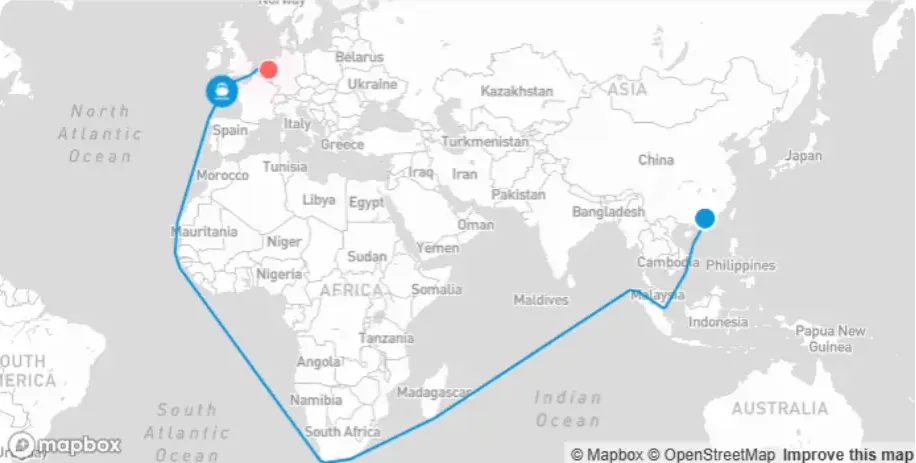
  • The whole route on the map, from departure to final destination
  • Volumes and weights: number of packages, CBM, gross weight, loading metres and container type
  • The delivery details, complete and with the right shipment
  • Your documents, such as the HBL, the commercial invoice and the packing list
  • A chat with your contact person, per shipment
De kaart in Explect Online met de route van een zending over zee, van China naar Nederland.

Your packaging, fully itemised

Your shipment shows exactly what's being shipped: the number of packages, the CBM, the weight, the chargeable weight and the loading metres. For each line you see the type, the dimensions, the weight and whether it's stackable or can be rotated.

De verpakking van een zending in Explect Online: het aantal colli, de CBM, het gewicht, het chargeable weight en de laadmeters, en per regel het type, de afmetingen, het gewicht en of het stapelbaar en draaibaar is.

To-dos for each event in your shipment

For each event you see what's still needed, so you know exactly when it's due. An event can only be completed once all blockers have been cleared, such as uploading the packing list and the commercial invoice.
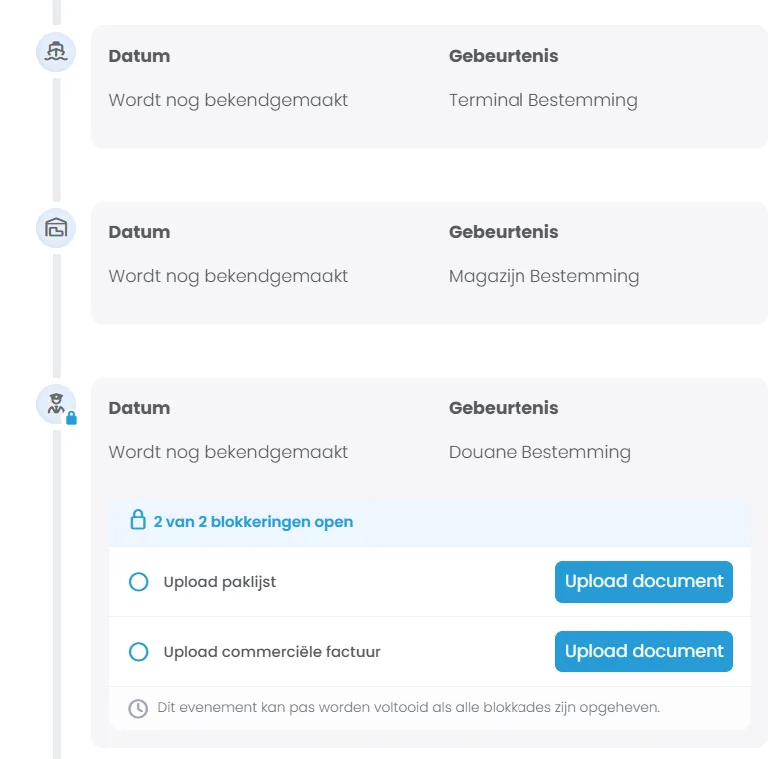
De gebeurtenissen van een zending in Explect Online, met bij de douane van bestemming twee openstaande blokkades: de paklijst en de commerciële factuur uploaden.

All your to-dos in one list

For each to-do you see the task, what it's blocking, how much time is left and the status. One click and you're on it: upload a document, add details or choose a date. You can assign to-dos to users.
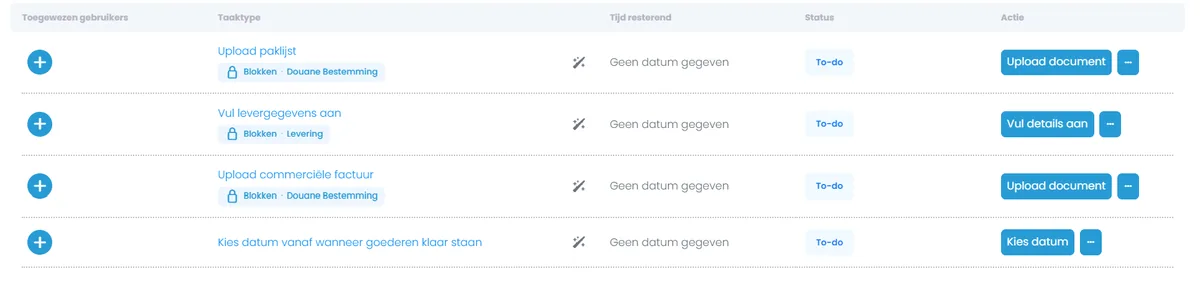
De lijst met to-do's van een zending in Explect Online: de taak, wat hij blokkeert, de tijd die er nog is, de status en een knop om hem op te pakken, zoals een document uploaden of een datum kiezen.

Who's involved in your file

You see which stakeholders are in your file and you can add stakeholders. You also see the transport number, the requested Incoterm, the mode of transport and your own reference. From the menu you can view the quote, change the reference or change the stakeholders.
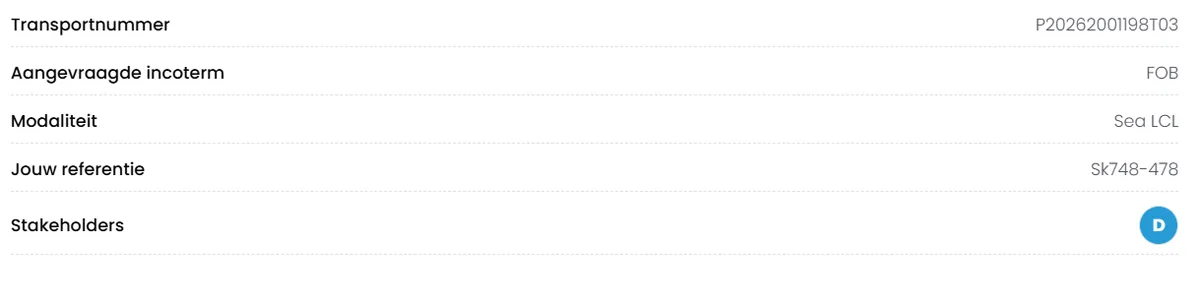
De gegevens van een zending in Explect Online: het transportnummer, de aangevraagde incoterm, de modaliteit, je eigen referentie en de stakeholders in het dossier.

Your shipment details, ever more complete

As your shipment progresses, the data fields fill up: the port of departure and the port of arrival, the expected dates, the bill of lading and the vessel. You can also see what isn't known yet.

Data fields

Container number
Not yet known
Estimated time of arrival (ETA)
2027-04-08
Estimated time of departure (ETD)
2027-03-04
Port of arrival
ROTTERDAM
Port of departure
NINGBO
House bill of lading number (HBL)
EXPL2700001
Master bill of lading number (MBL)
123456789
SCAC
TEST
Vessel
EXAMPLE EXPRESS
Voyage no
001E

Example with fictitious data.

How the transport dashboard works

  1. You book a shipment. It appears in your dashboard straight away.

  2. You upload your documents to the shipment.

  3. You follow the status and the route.

  4. A question along the way? Ask it in the chat for that shipment.

  5. Your shipment is delivered. Everything stays easy to find.

More control. Fewer mistakes.

Scattered emails and spreadsheets take time and will go wrong at some point. With everything in the same dashboard, you save up to 80 per cent of the time spent on your transport administration.

Register for Explect Online

Up and running fast, with help from our team

After a short introduction you can get started right away. Our team helps you along. Whether you ship now and then or every week.

Two Explect colleagues working at their desks by the office windows.

What you get

What it does for your supply chain

A grip on your whole chain

All your shipments in one overview, from supplier to customer.

Less time lost

No spreadsheets to keep up to date. Your shipment details fill in by themselves.

Spot mistakes sooner

You see a deviation straight away, not only when your goods are late.

The difference

Why not just a freight forwarder?

With a traditional freight forwarder

  • Days of emailing for a price, and extra costs afterwards
  • Your paperwork in your inbox, in Excel and with your supplier
  • You only spot a mistake in your documents at customs
  • Calling yourself to find out where your container is

With Explect and LEO

  • Your price within 1 working day, with all costs upfront
  • Everything in one place: quotes, bookings, documents and to-dos
  • Your documents checked before customs sees them
  • You track every shipment live, with a notification at every step

And behind LEO there's a team in Oud-Beijerland that's always there for you. No contract, your account is free.

Frequently asked questions about the transport dashboard

Can't find your question? Call or email us.

What is the transport dashboard?

The part of Explect Online where you manage all your international shipments, from quote to delivery. With tracking, documents and chat.

Who is it for?

For importers, exporters, online shops, manufacturers and trading companies.

Can I upload documents?

Yes. You upload your transport documents and link them to the right shipment.

How does the chat work?

You talk directly to your contact person. Every message belongs to the shipment it's about.

Are there any hidden costs?

No. All costs are clearly stated in advance.

How quickly can I get started?

After a short introduction you can get started right away. Our team helps you along.

All your shipments under control

Create a free account or see it first in a demo.